
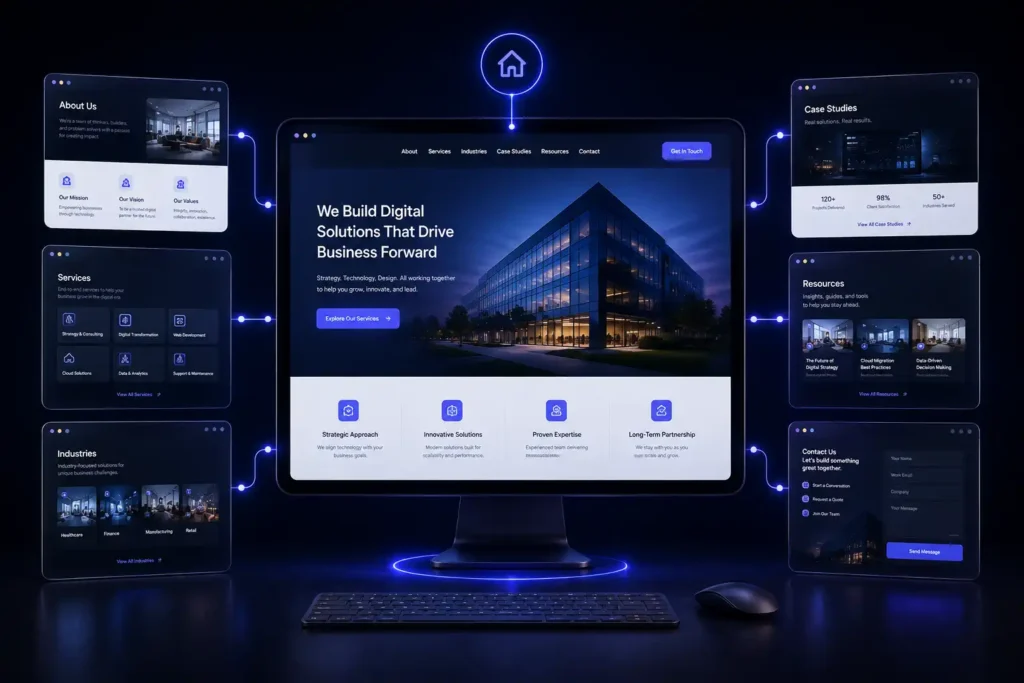

A corporate website has to do more than display a company logo, list a few services, and provide a phone number. It needs to explain what the business does, establish credibility, answer important questions, guide visitors toward the right action, and provide search engines with enough context to understand the company. That is why planning the right corporate website pages should happen before design and development begin.
A professional corporate website will usually include core pages such as Home, About, Services, individual service pages, Industries or Solutions, Case Studies or Projects, Contact, and privacy-related pages. Depending on the business, additional pages such as Resources, Blog, Careers, Locations, FAQs, Partners, Certifications, and dedicated landing pages may also be important.
The exact structure should depend on the company’s services, audience, sales process, locations, industry, and growth goals. A law firm, engineering company, SaaS provider, construction company, manufacturer, and consulting firm may all need different website structures even though they are all corporate websites.
This guide explains which corporate website pages are essential, which pages are optional, how pages should be organized, and how a well-planned structure can support SEO, credibility, user experience, and lead generation.
What Are Corporate Website Pages?
Corporate website pages are the individual sections of a company’s website that communicate its identity, services, expertise, credibility, and ways to do business with the organization.
A corporate website is generally designed to support several business goals at the same time. It may introduce the company to potential customers, explain complex services, attract search traffic, support sales conversations, recruit employees, provide resources, and generate inquiries. A strong corporate website structure connects these goals instead of treating every page as an isolated piece of content.
For example, a visitor may discover a company through a service page in Google, visit an About page to verify its credibility, review a case study, and then submit a contact form. The website structure should make that journey easy.
How Many Pages Should a Corporate Website Have?
There is no universal number of pages that every corporate website needs. A small professional business may need around 7 to 12 carefully planned pages, while a larger company may require dozens or even hundreds of pages covering services, industries, locations, resources, case studies, team members, and other business information.
The important factor is not page count. It is whether every page has a clear purpose. A corporate website should contain enough useful content to answer the questions customers have before contacting the business, without creating unnecessary pages that provide little value.
For example, a company offering five distinct services may benefit from five dedicated service pages instead of placing every service into one long Services page. The right approach is to build the website around the customer’s decision-making process.
1. Homepage
The homepage is usually the most important page on a corporate website because it provides the broadest introduction to the company. It should quickly communicate what the business does, who it serves, and why someone should consider working with it.
A strong homepage does not try to explain every detail. Instead, it gives visitors clear pathways to the information they need. The opening section should communicate the company’s primary value proposition without relying on vague marketing language. Visitors should understand the business within a few seconds.
A professional homepage commonly includes the company’s primary services, a short explanation of its approach, important differentiators, selected proof such as projects or testimonials, and clear calls to action. The homepage should also connect visitors to deeper pages. For example, a visitor interested in a particular service should be able to move directly from the homepage to the relevant service page rather than searching through a complicated navigation menu.
Avenzo Digital follows this type of structure on its own website by connecting its homepage with dedicated web design, WordPress, ecommerce, custom development, SEO, lead generation, conversion, performance, and support services.
2. About Us Page
The About page answers a question that many potential customers have before contacting a company:
Who are we actually considering doing business with?
The About page should provide useful context rather than simply repeating the company’s mission statement. It can explain the company’s background, expertise, approach, values, team, experience, and the types of clients it serves.
For professional services and B2B companies, this page can be particularly important because customers may be making decisions based on expertise and trust rather than impulse. A strong About page can also support E-E-A-T by giving visitors clearer information about the people and experience behind the organization. The content should remain specific. Instead of saying that a company is “committed to excellence,” explain what the company actually does, how it works, what it specializes in, and what customers can expect from the relationship.
3. Services Overview Page
A Services page gives visitors an organized view of everything the company offers. It should not simply be a long paragraph containing every service. The page should group services logically and provide enough information for visitors to understand which option may be relevant to them.
For example, a technology company might organize its services into web development, software development, integrations, consulting, and support. A marketing agency might separate SEO, paid advertising, social media, content, branding, and conversion services. The Services page should then link to individual service pages where appropriate.
This creates a logical hierarchy:
Services → Individual Service → Supporting Content → Contact
That structure makes navigation easier for visitors and creates useful internal linking pathways for search engines.
4. Individual Service Pages
For many corporate websites, individual service pages are more valuable than a single generic Services page. If a company offers several distinct services, each major service should usually have its own dedicated page. For example, a web development company could have separate pages for corporate website development, WordPress development, custom web applications, ecommerce development, and website redesign.
Each service page should explain the service in enough detail for a potential customer to understand the problem it solves and what working with the company involves. A service page can cover the service itself, who needs it, common challenges, the company’s process, important features, expected outcomes, relevant examples, FAQs, and the next step.
This approach also creates stronger SEO opportunities because each page can target a distinct search intent instead of forcing unrelated keywords onto one general page. Avenzo Digital’s current website uses dedicated service pages across web design, WordPress, ecommerce, custom development, SEO, lead generation, conversion optimization, and performance support.
5. Solutions or Industries Page
Not every company needs an Industries page, but it can be extremely useful when the business serves multiple markets. An industry-focused structure allows visitors to see how the company’s services apply to their specific situation.
For example, a technology company might create pages for:
Healthcare organizations, financial services, construction companies, professional services, manufacturing companies, SaaS businesses, and ecommerce companies. The key is to avoid creating thin pages that simply replace the industry name in the same template.
Each industry page should contain genuinely relevant information. It should explain the challenges customers in that industry face, how the company’s services address those challenges, and what considerations are important when selecting a provider.
Avenzo Digital currently identifies several industries it serves, including professional services, construction and engineering, technology and SaaS, ecommerce and retail, hospitality, travel, and local service businesses.
6. Case Studies or Projects Page
A corporate website should not only tell visitors what a company can do. It should provide evidence. That is where case studies and project pages become valuable. A Case Studies page can show how the company approached real projects and what was delivered. A useful case study typically explains the client’s situation, the challenge, the approach, the work completed, and the outcome.
For example, a website development case study might explain that a company had an outdated website with poor mobile usability. The project could then describe the redesign, technical improvements, content restructuring, and conversion improvements.
Case studies are especially valuable for B2B businesses because buyers often want evidence before beginning a conversation. Avenzo Digital’s current website includes selected projects and case studies covering areas such as landing pages, ecommerce, website redesign, lead generation, and SEO-related work.
7. Contact Page
The Contact page should make it easy for a qualified visitor to take the next step. A contact page does not need to be complicated, but it should provide enough information to make contacting the company straightforward. Depending on the business, it may include a contact form, email address, phone number, office information, business hours, service area, map, or links to relevant communication channels. The form itself should not ask for unnecessary information.
If the objective is to generate qualified business inquiries, the form may request the person’s name, business email, company website, service required, and a short description of the project. The call to action should also be clear.
“Submit” is functional, but something like “Request a Consultation” or “Discuss Your Project” can better communicate what happens next. Avenzo Digital’s current website uses project-focused contact forms and consultation calls as conversion paths.
8. Careers Page
A Careers page can be important for companies that are actively hiring or want to build a strong employer brand. The page should explain what it is like to work at the organization and identify current opportunities. A useful Careers page may include company culture, available positions, employee benefits, working arrangements, hiring process information, and application instructions.
Smaller companies do not necessarily need a dedicated Careers page if they rarely recruit. A simple hiring section can sometimes be enough. The decision should be based on actual recruitment needs rather than adding a page simply because other corporate websites have one.
9. Team or Leadership Page
A Team page can be valuable for businesses where customers want to know who they will be working with. This is particularly relevant for consulting firms, law firms, engineering companies, financial organizations, agencies, healthcare organizations, and other professional services.
Team profiles can include a person’s role, professional background, areas of expertise, credentials, certifications, and relevant experience. The information should be kept accurate and updated. For companies where individual expertise is central to the buying decision, team pages can also support trust and credibility.
10. Testimonials and Reviews
Customer feedback can help reduce uncertainty. A dedicated Testimonials page is not mandatory for every business. In many cases, testimonials work better when they are placed contextually throughout the website.
For example, a service page can include feedback from a customer who specifically purchased that service.
A Case Study can contain a testimonial related to the project being discussed. The homepage can feature a small selection of broader customer feedback. This creates stronger context than placing every review on a single page. Businesses should also avoid publishing anonymous or unverifiable claims simply to make the website appear more credible.
11. FAQ Page
An FAQ page can answer common questions that potential customers ask before contacting a company. It can be especially useful for businesses with complex services, technical processes, pricing considerations, compliance requirements, or long sales cycles.
Questions might cover:
- How the service works
- How long projects typically take
- What information the customer needs to provide
- What platforms are supported
- What happens after an inquiry
- What is included in the service
- How ongoing support works
However, FAQs should not become a collection of questions created only for search engines. The best questions come from actual customer conversations, sales calls, support requests, and common objections. An FAQ can also support AI search visibility because clear question-and-answer content gives search systems concise information to interpret.
12. Resources or Blog Page
A corporate blog can support both customers and organic search visibility. It provides a place to publish educational content around the company’s expertise.
For example, a web development company could publish content about website costs, corporate website structure, website redesign, technical SEO, website performance, WordPress development, and conversion optimization.
The blog should support the company’s core services rather than becoming a collection of unrelated topics. A useful content structure might look like:
Core Service → Supporting Topic → Detailed Guide → Service Page
This helps create topical relevance and gives readers useful paths from educational content toward commercial information. Avenzo Digital currently maintains a Blog section as part of its website architecture.
13. Locations or Service Areas Pages
A Locations page can be useful when a corporate business serves multiple geographic markets. This is especially relevant for companies with physical offices, regional operations, or location-specific services. However, location pages should provide genuine value.
A page should explain the services available in that area, relevant business information, local expertise, and any meaningful differences in how the company operates there. Creating dozens of nearly identical location pages with only city names changed can create poor-quality content and a weak user experience.
For businesses targeting customers across the United States, geographic targeting should be planned around actual service areas and search demand.
14. Partners, Certifications, and Affiliations
Some businesses benefit from dedicated pages explaining partnerships, certifications, memberships, technology relationships, or industry affiliations. These pages can be particularly useful when credentials affect the purchasing decision.
For example, an engineering company may need to communicate professional qualifications, industry memberships, certifications, or technical capabilities.
A technology company may want to explain its relationships with specific platforms. The content should explain why the credential or partnership matters rather than simply displaying logos.
15. Privacy Policy and Legal Pages
Legal pages are essential parts of a professional website, even though they are rarely major conversion pages. Depending on the business and its operations, the website may need pages such as a Privacy Policy, Terms and Conditions, Cookie Policy, Accessibility Statement, Disclaimer, or other legal information.
The exact requirements can vary based on the business, location, industry, audience, and data collection practices. Legal content should be reviewed appropriately for the company’s circumstances rather than copied blindly from another website. These pages also need to remain accessible from the website, usually through the footer.
16. Sitemap Page and XML Sitemap
A visual HTML sitemap is optional, but an XML sitemap is important for search engine discovery on most modern websites. An XML sitemap helps search engines identify important URLs that should be crawled. It should contain canonical, indexable URLs and should be kept current as the website changes.
The XML sitemap is not primarily a user-facing page, but it is part of the technical structure that supports a well-organized corporate website. A properly planned website also needs clean URLs, logical internal links, appropriate heading structure, responsive layouts, and crawlable content.
What Corporate Website Pages Are Essential?
For most professional businesses, the essential foundation includes the Homepage, About page, Services page, individual core service pages, Contact page, and appropriate legal pages. Case Studies, FAQs, Industries, Team, Careers, Resources, Locations, and other pages should be added when they serve a real business or customer need.
The goal is not to build the largest possible website. The goal is to build the most useful website for the company’s audience.
How Should Corporate Website Pages Be Organized?
A good corporate website structure should make important information easy to find.
A simple hierarchy might look like this:
Home → Services → Service Detail
Home → Industries → Industry Detail
Home → Projects → Case Study
Home → Resources → Article
Home → About → Team
Home → Contact
This structure creates clear relationships between pages. It also makes internal linking easier.
For example, an article about corporate website redesign can link to the website redesign service page. A case study can link to the service used in that project. An industry page can link to the services most relevant to that industry.
The result is a website where pages support each other rather than competing for attention.
How Corporate Website Structure Supports SEO
Website architecture has a direct relationship with how search engines discover and interpret content. Search engines need to understand which pages are important, how topics are related, and what each URL is about. A strong structure helps by creating logical relationships between related content.
For example, a website development company might have a Corporate Website Development page supported by articles about website planning, corporate website design, website navigation, website costs, and website redesign.

Those articles can naturally link back to the relevant commercial page. This creates a content ecosystem rather than a collection of disconnected URLs. Technical SEO also needs to be considered during development.
Avenzo Digital states that its web development work considers technical foundations such as heading structure, responsive layouts, crawlable content, clean URLs, metadata support, image optimization, and performance.
Should Every Service Have Its Own Page?
Not necessarily. A service deserves an individual page when it represents a meaningful customer need, has distinct search intent, requires a different explanation, or represents an important commercial offering. Creating a separate page for every tiny variation can make a website harder to manage.
For example, a company offering “website design,” “professional website design,” and “business website design” does not necessarily need three separate pages.
Those terms may represent the same underlying service. Instead, one comprehensive service page can address the relevant variations naturally. The decision should be based on customer intent and business structure rather than simply the number of keywords available.
Should a Corporate Website Have a Blog?
For many companies, yes, but only when there is a clear content strategy behind it. A blog can attract people who are researching problems before they are ready to contact a company.
For example, someone searching for “how many pages should a corporate website have” may not be ready to hire a developer immediately. An educational article can answer that question and introduce the reader to the company’s expertise.
Other readers may search for more commercial topics such as corporate website development, website redesign, WordPress development, or website performance. A well-planned content strategy can serve both groups. The key is to avoid publishing articles simply to increase the number of URLs on the website. Every article should have a purpose.
How Many Corporate Website Pages Should Be Indexed?
Not every URL needs to be indexed by search engines. The objective should be to have important, useful, unique pages available for search while avoiding unnecessary URLs. Pages that often deserve indexation include core service pages, useful industry pages, important location pages, case studies, valuable resources, and strong educational articles.
Thin tag archives, duplicate variations, internal search results, unnecessary parameter URLs, and other low-value pages may not need to be indexed. This is where technical SEO becomes important. A website should be reviewed for crawlability, canonicalization, indexation, internal linking, redirects, duplicate content, and sitemap accuracy.
Common Corporate Website Structure Mistakes
A common mistake is trying to put everything on the homepage. The homepage should introduce the business, not replace the entire website. Another problem is creating one generic Services page and expecting it to rank for every service the company provides.
A third issue is creating pages without a clear purpose. If a page does not answer a meaningful customer question, support a business goal, or provide useful information, it may not deserve to exist. Another frequent problem is weak internal linking.
A corporate website may contain excellent pages, but if those pages are buried and difficult to reach, users and search engines may struggle to discover them. Finally, many businesses design their pages around internal company language instead of customer language. Visitors care about their problem first. The website should explain how the company can help in terms that the target audience understands.
How to Plan Corporate Website Pages Before Development
Page planning should happen before the visual design is finalized. A practical planning process starts with understanding the business and its audience.
Step 1: Identify the Main Business Goals
Determine whether the website is primarily intended to generate leads, support sales, establish credibility, recruit employees, provide information, sell products, or support existing customers. Most corporate websites have multiple goals, but one or two should be prioritized.
Step 2: Identify the Main Audiences
List the major groups that will use the website.
For example, a company may serve business owners, procurement teams, technical managers, investors, job candidates, and existing customers.
Each audience may need different information.
Step 3: Map Services and Topics
List every major service and determine which services deserve dedicated pages. Then identify the questions people commonly ask about those services. This creates the foundation for service pages, FAQs, resources, and blog content.
Step 4: Build the Navigation
Once the content groups are clear, organize them into a logical navigation structure. The primary menu should prioritize the pages that matter most to customers. Less important information can remain accessible through secondary navigation or the footer.
Step 5: Plan Internal Links
Decide which pages should link to each other. For example, a service page should link to relevant case studies, FAQs, and supporting resources. A blog article should link to the service it discusses when the connection is genuinely useful.
Step 6: Review the Structure for SEO
Before development, review URL structure, page hierarchy, keyword intent, content requirements, redirects if replacing an existing website, and technical SEO considerations.
Avenzo Digital’s development process similarly places discovery, UX, content, technical planning, design, development, QA, and launch into a structured workflow.
How Design and UX Affect Corporate Website Pages
Good corporate website structure is not only about SEO. It also determines how easily people can use the website. A visitor should be able to answer basic questions without excessive clicking:
What does this company do?
Who does it serve?
Can it solve my problem?
Why should I trust it?
What should I do next?
Navigation, page hierarchy, typography, spacing, calls to action, mobile layouts, and content organization all influence the answers. A corporate website can have technically correct pages and still perform poorly if the information is difficult to understand. This is why UX planning should happen alongside content planning rather than after all the content has been written.
Corporate Website Pages Should Support Conversion
Not every page needs to be a sales page. However, every important page should provide a sensible next step. A service page might encourage visitors to request a consultation. A case study can invite readers to discuss a similar project. An educational article can point readers toward a relevant service.
An About page can direct visitors toward services or contact information. The call to action should match the visitor’s level of intent. Someone reading an introductory article may need more information before requesting a consultation. Someone reading a detailed service page may be ready to contact the company.
Avenzo Digital’s own website uses different conversion paths, including project inquiries, consultations, service exploration, and case studies.
When Should You Redesign Your Corporate Website?
A redesign may be appropriate when the existing website no longer represents the company accurately or creates problems for users. Common warning signs include outdated design, confusing navigation, poor mobile experience, slow performance, weak messaging, outdated services, difficult content management, and poor conversion paths.
However, redesigning a website should not simply mean changing colors and fonts. A proper redesign should evaluate the existing information architecture, content, SEO performance, technical setup, conversion paths, and user experience.

Avenzo Digital describes website redesign as a process for improving design, structure, messaging, speed, mobile experience, functionality, and the conversion journey.
When Professional Corporate Website Development Makes Sense
A corporate website can look simple from the outside while requiring significant planning behind the scenes. Professional development can be especially useful when a company needs a custom information architecture, multiple service areas, integrations, advanced forms, CRM connectivity, custom functionality, performance optimization, or a website that needs to support long-term growth.
It can also be valuable when an existing website has accumulated technical problems. Avenzo Digital’s corporate website development offering sits within its broader custom development services, alongside web applications, custom PHP development, and specialized development.
The goal should be to create a website that remains useful as the business grows. That means planning for future services, additional pages, integrations, marketing campaigns, content, and changes in customer behavior.
Request a Free Website Audit
If your existing website has too many pages, unclear navigation, outdated content, or weak conversion paths, adding more pages may not solve the problem.
The first step should be understanding what is already working and where the structure needs improvement. A Free Website Audit can help identify issues involving website structure, UX, technical SEO, page organization, mobile usability, performance, and conversion opportunities.
If you are planning a new corporate website, a discovery session can also help determine which pages you actually need before design and development begin. Avenzo Digital provides website planning, development, redesign, technical improvement, SEO, and ongoing support for businesses across the United States.
Conclusion
The right corporate website pages give a business more than a professional online presence. They create a structured system for communicating expertise, explaining services, establishing trust, attracting search traffic, and generating qualified inquiries.
Most companies need a strong foundation consisting of a Homepage, About page, Services page, individual core service pages, Contact page, and appropriate legal information. Depending on the business, that foundation can be expanded with Case Studies, Industries, FAQs, Resources, Team, Careers, Locations, Certifications, and other useful content.
The most important principle is to avoid building pages simply to make the website appear larger. Every page should have a clear purpose. It should answer a customer question, explain a service, demonstrate expertise, provide evidence, support search visibility, or move the visitor toward an appropriate next step.
For a new website, this planning should happen before design and development. For an existing website, an audit can reveal which pages should be consolidated, expanded, redesigned, redirected, or created. A professional corporate website should be structured around the people using it and the business outcomes it needs to support. When content, UX, technical SEO, development, and conversion strategy are planned together, the website becomes a much stronger business asset.
If your current website structure is unclear or you are preparing for a new corporate website, start by reviewing your existing pages and identifying the gaps. A professional website audit or discovery session can help turn that list into a practical sitemap and development plan.
Frequently Asked Questions
What are the most important corporate website pages?
The most important corporate website pages are usually the Home, About, Services, individual service pages, Contact, and appropriate legal pages. Case Studies, FAQs, Industries, Resources, Team, Careers, and Locations should be added when they serve a clear business or customer purpose.
How many corporate website pages should a company have?
There is no fixed number. A small company may need fewer than 10 core pages, while a larger organization may require dozens or hundreds. The right number depends on services, audiences, locations, content needs, and business goals.
Should every service have its own website page?
Every major service does not automatically need its own page, but distinct services with different customer intent usually benefit from dedicated pages. Separate pages allow the company to explain each service in greater depth and target relevant search queries.
Should corporate website pages be optimized for SEO?
Yes. Important pages should have clear search intent, useful content, logical headings, descriptive URLs, internal links, appropriate metadata, responsive design, and strong technical foundations. SEO should be considered during planning rather than added after development.
Should a corporate website have a blog?
A blog is useful when the company has a clear content strategy. Educational articles can answer customer questions, demonstrate expertise, attract organic search traffic, and guide readers toward relevant commercial services.
What pages build trust on a corporate website?
About, Team, Case Studies, Projects, Testimonials, Certifications, Partners, and detailed service pages can all contribute to trust. The strongest trust signals are specific, verifiable, and relevant to the customer’s decision.
Do corporate websites need an FAQ page?
An FAQ page is useful when customers regularly ask similar questions. However, FAQs can also be placed directly on relevant service pages so that the information appears in the context where visitors need it.
What should be on a corporate website homepage?
A corporate homepage should clearly explain what the company does, who it serves, why it is credible, what services it provides, and what visitors should do next. It should also guide users toward deeper service, industry, case study, and contact pages.
Should a corporate website have separate industry pages?
Industry pages can be valuable when a company serves multiple markets with different needs. Each page should contain genuinely useful, industry-specific information rather than repeating the same content with a different industry name.
How can I improve my corporate website pages?
Start by reviewing your current page structure, navigation, content quality, internal links, SEO, mobile experience, speed, conversion paths, and outdated information. Remove unnecessary pages, strengthen important pages, and create new pages only when they address a real customer or business need.